
















Most website owners share a familiar routine when it comes to analytics. They log in, scan the graphs, notice traffic going up or down, and then close the tab. Not because the data is missing, but because the meaning behind the data is unclear.
A dashboard can show performance, but it rarely explains direction. It tells you what happened, not why it happened or what you should do next. That gap between information and action is exactly what MonsterInsights addresses with its latest update, version 10.2, introducing a new feature called Charlie Chat.
This release represents a shift in how website analytics is consumed — moving from static reports to conversational, guided decision-making.
The Core Problem With Traditional Analytics
Modern analytics platforms, including GA4 dashboards, are powerful but often overwhelming. They are built to display data at scale, but not necessarily to interpret it for the average user.
For example, when a website owner sees a 12% drop in sessions, several questions immediately arise:
- Is this drop serious or seasonal?
- Which traffic source caused the decline?
- Is this happening across all pages or just specific content?
- What action should be taken to recover performance?
Traditional dashboards rarely answer these questions directly. Users are left to manually compare reports, filter data, and interpret trends on their own. This creates a gap between data access and data understanding.
Introducing Charlie Chat: A Conversational Analytics Assistant
Charlie Chat is designed to eliminate that gap entirely.
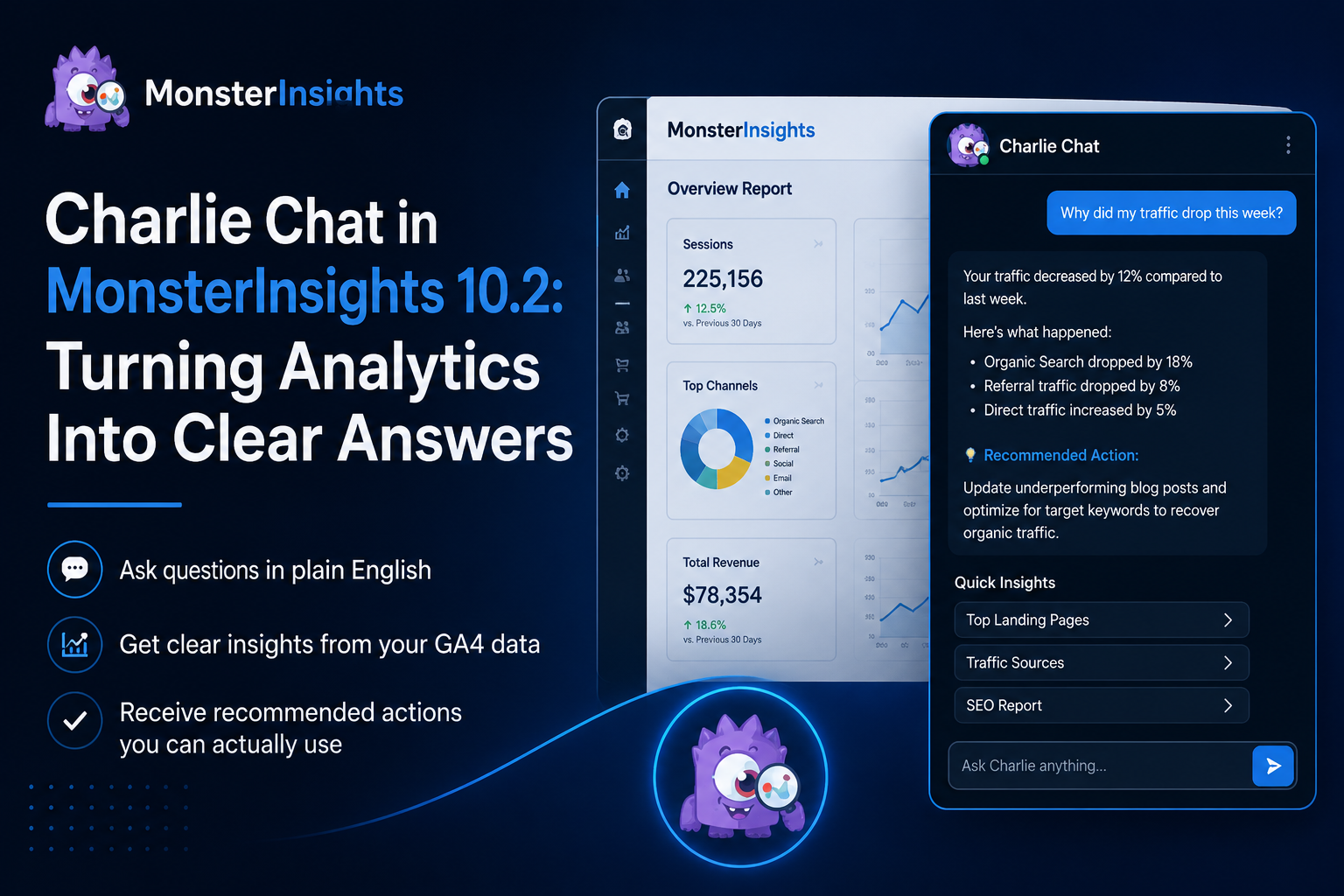
Instead of forcing users to interpret dashboards, it allows them to simply ask questions in plain English and receive structured, meaningful answers directly from their GA4 data.
Example questions users can ask:
- “Why did my traffic drop this week?”
- “Which blog post should I improve next?”
- “What is my best-performing landing page this month?”
- “How is my SEO performance trending?”
What makes Charlie Chat different is not just the answers, but the way those answers are presented. Each response includes:
- A direct explanation of the data
- Context comparing past performance
- A clear breakdown of contributing factors
- A recommended next step
This transforms analytics from a reporting system into a decision-support system.
From Data to Meaning in Seconds
Charlie Chat is embedded directly inside the MonsterInsights dashboard, acting like a built-in data analyst.
When a user opens the dashboard, Charlie is accessible via a chat icon. Once activated, it immediately connects to the website’s GA4 data and begins interpreting it in real time.
Instead of presenting raw numbers like:
“Traffic decreased by 12%”
Charlie reframes it into something actionable:
- Which channels contributed to the drop
- Whether it is tied to organic, referral, or paid traffic
- How current performance compares to previous periods
- What corrective actions are recommended
For example, if organic traffic declines, Charlie may suggest:
- Updating underperforming blog content
- Improving SEO targeting for specific keywords
- Reviewing recent ranking changes
- Strengthening internal linking strategies
This contextual layer is what turns analytics into a practical growth tool rather than a reporting tool.
What’s New in MonsterInsights 10.2
The 10.2 update introduces two major improvements:
1. Charlie Chat (AI Analytics Assistant)
A conversational interface that allows users to ask questions and receive actionable insights from their analytics data.
2. Improved Notification Center
A redesigned system that organizes alerts into three categories:
- All notifications
- Saved notifications
- Archived notifications
This makes it easier for users to track important updates without losing focus in a cluttered dashboard environment.
How Charlie Chat Works Behind the Scenes
Charlie Chat is built on top of existing GA4 integrations but layers an intelligence system over raw data interpretation.
It performs three key functions:
1. Data Retrieval
It pulls relevant metrics from GA4 based on the user’s question.
2. Context Analysis
It compares current data with historical performance to identify trends, anomalies, or changes.
3. Action Recommendation
It translates insights into practical suggestions that users can apply immediately.
This structure ensures that responses are not just descriptive but prescriptive — meaning they guide action rather than just reporting numbers.
Practical Use Cases Across Different Users
Charlie Chat is designed for a wide range of users, not just analysts or marketers.
Small Business Owner
They can quickly understand whether their website is growing or declining without learning analytics tools.
Bloggers and Content Creators
They can identify which articles need updates, which topics perform best, and where to focus future content efforts.
eCommerce Stores
They can monitor revenue trends, cart abandonment rates, and product performance without digging into complex reports.
Marketing Teams
They can access quick insights for reporting, campaign optimization, and performance tracking.
In all cases, the goal remains the same: reduce complexity and increase clarity.
Smarter Insights Across SEO, Content, and Sales
One of Charlie Chat’s strongest features is its ability to analyze multiple business dimensions, not just traffic.
Users can explore:
- SEO performance trends
- Blog engagement and readership patterns
- Landing page conversion rates
- eCommerce revenue and purchase behavior
- Cart abandonment and funnel performance
Instead of switching between multiple dashboards or reports, users get unified answers in a single conversation.
This helps eliminate fragmentation in analytics workflows, especially for growing businesses.
Pinning, History, and Continuous Tracking
Charlie Chat also introduces persistent conversation tracking.
Users can:
- Pin important insights for future reference
- Access full chat history anytime
- Revisit previous performance discussions
This is particularly useful for long-term strategy work, such as:
- Weekly SEO tracking
- Monthly performance reviews
- Content planning cycles
- Marketing optimization reports
Rather than repeating the same analysis every week, users can build a continuous intelligence log of their website’s performance.
A Better Notification Experience
Alongside Charlie Chat, the improved Notification Center in MonsterInsights 10.2 adds structure and clarity to dashboard alerts.
Instead of a single feed, notifications are now organized into:
- Active alerts requiring attention
- Saved insights for later review
- Archived updates for historical reference
This helps reduce clutter and ensures important recommendations are not missed.
Who This Update Is Designed For
The goal of Charlie Chat is not to replace analytics, but to simplify it for everyday users.
It is especially useful for:
- Users who feel overwhelmed by GA4 dashboards
- Businesses without dedicated data analysts
- Teams needing fast, actionable insights
- Creators focused on content strategy rather than technical reporting
It bridges the gap between raw data and real-world decision-making.
Final Thoughts
Website analytics has always been powerful, but often inaccessible in practice. The data exists, but the interpretation barrier remains high.
With the introduction of Charlie Chat, MonsterInsights is shifting the experience from passive reporting to active guidance.
Instead of asking users to interpret charts, it allows them to ask questions and receive answers that include meaning, context, and direction.
This marks a significant evolution in how website owners interact with their data — from simply observing performance to actively improving it.
In short, analytics is no longer just about what happened.
It is now about what to do next.